
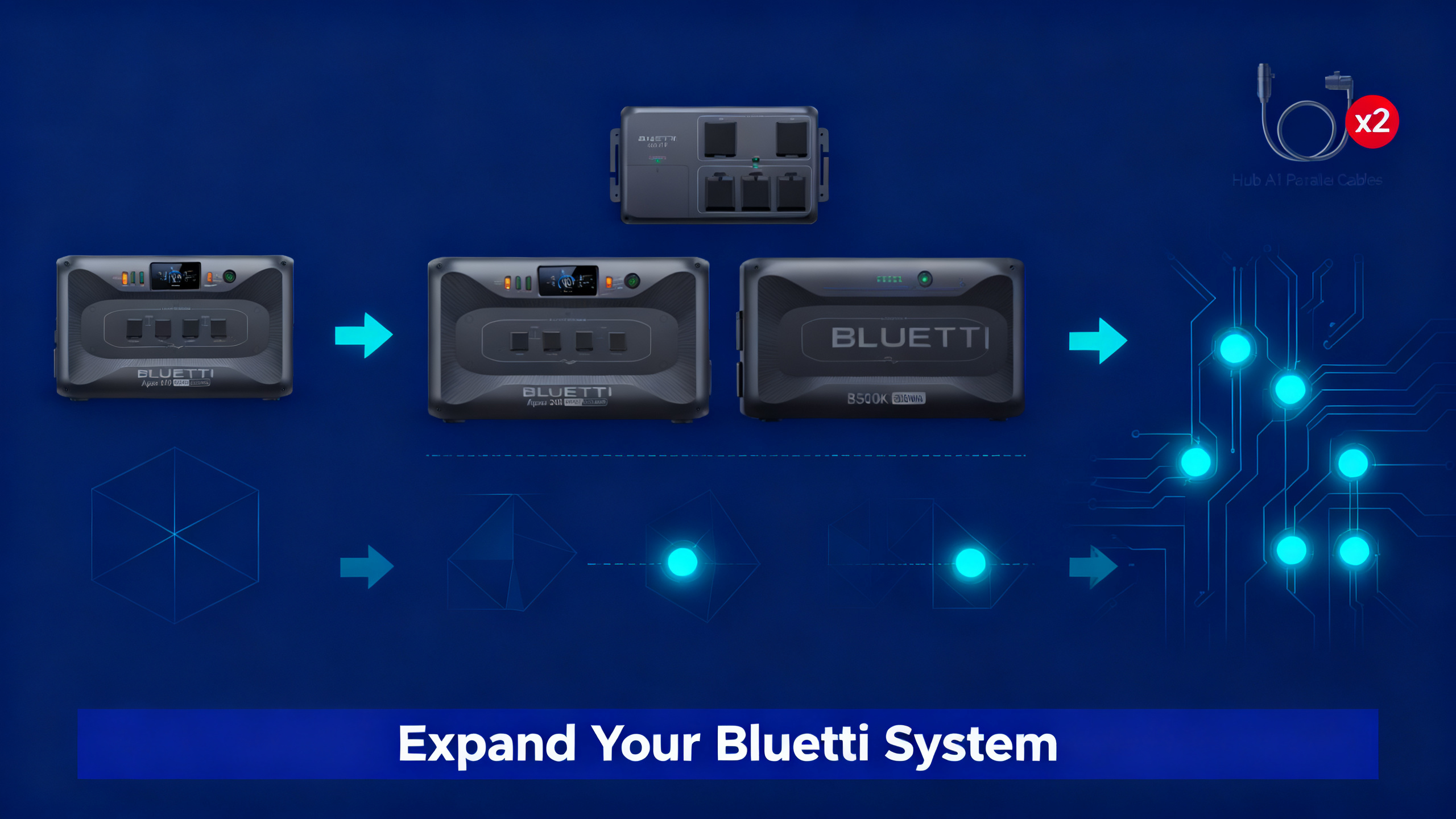
Your BLUETTI station is running near full capacity during a power outage, and you’re rationing between the refrigerator, the CPAP machine, and phone chargers. You don’t need a new power station. You need more capacity in the system you already have.
This guide covers every expansion option available for compatible BLUETTI stations in 2026, from adding a single B300K to building a 9,216Wh home backup system. The process is more straightforward than it looks once you understand the component structure. Before choosing which components to add, a quick look at the Bluetti brand overview makes clear which stations are designed for modular expansion and which are not.

BLUETTI Apex 300
$1,599 $2,399
- 3,072Wh base capacity, expandable to 9,216Wh with B300K units
- Compatible with Hub A1, Hub D1, and Charger 1 ecosystem
- Dual-voltage AC output, BLUETTI App control
Get our Black Friday alerts for BLUETTI
We track live prices on 40+ models from Jackery, EcoFlow, BLUETTI and Anker SOLIX. When a deal beats the lowest price we've recorded, you'll hear from us. During Black Friday week, one short recap a day at most.
Unsubscribe in one click. We may earn a commission when you buy through our links, at no extra cost to you. Privacy Policy
Which BLUETTI Stations Can Be Expanded?
Not every BLUETTI station supports external battery modules. Before purchasing anything, confirm your model is on the compatible list. If it’s not, adding a B300K isn’t an option: the hardware interface simply doesn’t exist on non-expandable units.
The expandable lineup in 2026 includes the Apex 300, AC300, AC500, and AC200L (via legacy B230 and B300 modules). Stations including the AC180, AC70, and EB3A have fixed internal capacity. The is AC180 expandable review page confirms this model does not support external battery modules, making it unsuitable for capacity expansion projects.
Which BLUETTI Stations Can Be Expanded?

For a full map of compatible configurations across the entire lineup, the expansion systems overview covers every expandable model currently available.
What You’ll Need Before You Start
Expansion involves three core components plus one optional add-on. Getting clarity on each before purchasing avoids the common mistake of ordering a B300K without the required hub.
Required Components
- BLUETTI Apex 300 (or AC300 / AC500 / AC200L depending on your existing station)
- B300K Expansion Battery : 1 or 2 units, each adding 3,072Wh
- Hub A1 or Hub D1 : required interface between station and B300K (Apex 300 configurations)
- BLUETTI App (iOS or Android) : confirms capacity recognition and enables firmware updates
- Connection cable: included with the B300K unit
Optional Add-Ons
- BLUETTI Charger 1: adds vehicle alternator charging input ($299)
- Solar panels: compatible with the Apex 300’s solar input for off-grid recharge
Expansion Process at a Glance
1
Confirm Compatibility
Verify your station supports external battery modules
2
Choose B300K Quantity
1 or 2 units depending on your capacity target
3
Select Hub (A1 or D1)
Hub A1 for stacking; Hub D1 for distributed setup
4
Add Charger 1 (Optional)
For vehicle/alternator charging of the expanded system
5
Connect via App
BLUETTI App confirms recognition and total capacity
Get our Black Friday alerts for BLUETTI
We track live prices on 40+ models from Jackery, EcoFlow, BLUETTI and Anker SOLIX. When a deal beats the lowest price we've recorded, you'll hear from us. During Black Friday week, one short recap a day at most.
Unsubscribe in one click. We may earn a commission when you buy through our links, at no extra cost to you. Privacy Policy
Step 1: Confirm Your Station’s Expansion Compatibility
The first check is your model number, which appears on a label on the base or rear panel of the unit. Cross-reference it against the BLUETTI official expansion compatibility chart to confirm which modules and hubs are supported for your specific hardware revision.
The B300K is the cornerstone of any expansion project. The full B300K review and specs breaks down its 3,072Wh rating, compatibility matrix, and current pricing. Keep in mind that the B300K requires LFP (lithium iron phosphate) chemistry, which means it’s rated for 3,500+ cycles: a meaningful consideration for anyone planning long-term home backup use.


Once compatibility is confirmed, also verify your station’s firmware is current. The BLUETTI App prompts updates automatically after pairing: an outdated firmware version is the most common reason the system fails to recognize a newly connected B300K.
⚠️ Common mistake: Purchasing a B300K without a hub. The B300K does not connect directly to the Apex 300 without Hub A1 or Hub D1 as the interface. Attempting a direct connection is not a supported configuration and will result in the module not being recognized.
Spec analysis confirms the B300K adds exactly 3,072Wh per unit, and the Apex 300 supports a maximum of two units in parallel. Per the B300K specs on BLUETTI.com, the module measures 16.7 x 11.5 x 10.6 inches and weighs 66 lbs, so physical placement and floor loading are worth factoring into your setup plan.
Step 2: Choose Your B300K Configuration
The choice between one or two B300K units comes down to your target capacity and budget. Both configurations use the same hub and connection process. The difference is simply the total watt-hours available and the corresponding runtime at your typical load.
Single B300K: 6,144Wh Total with Apex 300
Adding one B300K brings the system from 3,072Wh to 6,144Wh. Runtime calculations based on this combined capacity show a full-size refrigerator running for approximately 40-50 hours, a CPAP machine (without humidifier) for 80+ hours, and continuous LED lighting for several days. For weekend camping or a 24-48 hour home outage scenario, this configuration covers most households comfortably.
BLUETTI Apex 300 Review
Full spec sheet, performance data, and every compatible expansion accessory in one place.
Dual B300K: 9,216Wh Total with Apex 300
Two B300K units reach the maximum supported capacity of 9,216Wh. This is the configuration for multi-day home backup: efficiency data suggests this covers a typical home’s critical loads (refrigerator, lights, phone charging, CPAP) for 3-4 days without grid input. Off-grid cabin use and full-time RV setups where solar recharge supplements the battery are the primary applications.
The Apex 300 + 2x B300K bundle is priced at $3,499 (originally $4,999), which represents meaningful savings versus purchasing components individually. Budget analysis shows this configuration delivers the lowest cost-per-Wh of any BLUETTI expandable setup in 2026.
Step 3: Select the Right Hub: A1 vs D1
Both the Hub A1 and Hub D1 serve as the physical and electronic interface between the Apex 300 and external B300K units. They manage load distribution, thermal monitoring, and communication across the expanded system. The choice between them affects placement flexibility rather than raw performance.
Hub A1 is designed for vertical stacking: the B300K units sit on top of or beside the Apex 300 in a compact, consolidated footprint. This configuration suits permanent indoor installations where floor space is limited. Hub D1 supports a distributed layout, allowing the B300K units to be placed further from the main station, which is useful for thermal management in warmer environments or when the main unit needs to remain accessible. The dedicated comparison on which hub for expansion covers every compatibility scenario across the current lineup.

For AC200L users, the hub structure is different: the AC200L uses B230 and B300 legacy modules that connect directly without a separate hub. Published compatibility data confirms this model reaches approximately 7,000Wh maximum. That’s a solid entry-level expandable setup, though the B300K-based systems available to Apex 300 owners offer greater long-term headroom.
Step 4: Physical Connection Process
The connection sequence matters. Following it correctly ensures the system recognizes the B300K and updates capacity properly. Doing it out of order is the second most common reason users report the expansion not showing up in the app.
Connecting the B300K
- Power off the Apex 300 completely. Don’t just put it in standby: hold the power button until all indicators go dark.
- Connect the DC cable from the B300K to the hub. The connector is keyed and only fits one way. You’ll feel a click when it’s seated properly.
- Power on the B300K first. Wait for its display to show a stable charge percentage before proceeding.
- Power on the Apex 300. The main display will update to reflect the combined system capacity within a few seconds.
- Open the BLUETTI App and confirm the capacity readout. You’ll know it’s correct when the displayed Wh matches the expected combined total.
💡 Pro Tip: If the app doesn’t reflect the updated capacity after connection, check for a pending firmware update. User-reported configurations consistently show that an outdated firmware build is the primary cause of recognition failures on first connection.
Mounting and Cable Management
Position the B300K on a flat, stable surface with at least 4 inches of clearance on all sides for ventilation. The unit generates mild heat during charge cycles: keeping airflow unobstructed prevents thermal throttling. For permanent installations, routing the DC cable along baseboards or through cable raceways keeps the setup clean and avoids trip hazards.

Two B300K units connect to the same hub sequentially using the same process. Power down between each addition. The app will show capacity increasing in steps as each module is recognized.
Step 5: Add the BLUETTI Charger 1 for Vehicle Charging
The Charger 1 is optional, but it changes the practical use case of an expanded system significantly. Without it, recharging depends on AC wall power or solar input. With it, you can recharge the entire system via a vehicle’s alternator while driving, which matters for van life, RV travel, and extended off-grid scenarios where grid access is intermittent.
Connection is straightforward: the BLUETTI Charger 1 connects to the Apex 300’s DC input port via the included cable. The unit handles alternator voltage regulation internally, which means no additional charge controller is required. At $299 (originally $399), it’s a practical add-on for mobile users who need consistent top-up capability between solar sessions.

Published specifications confirm the Charger 1 is compatible with the Apex 300 DC input and functions without modification to the vehicle’s electrical system beyond a standard accessory connection. It does not require a dedicated high-amp circuit.
BLUETTI Hub A1 vs Hub D1
Every compatibility scenario compared: which hub fits your expansion layout.
Recommended Expansion Setups by Use Case
The Apex 300 expandable flagship review covers the full spec sheet, real-world performance data, and every compatible expansion accessory in one place. Below are the three most common expansion configurations based on use case, with capacity targets matched to actual power demands.
Weekend Camping (Apex 300 + 1x B300K)
For 2-3 day camping trips, a 6,144Wh system covers all standard loads without the bulk and weight of a second B300K. Efficiency data for this configuration supports running a portable refrigerator, charging phones and laptops continuously, powering lighting, and operating a CPAP machine for multiple nights. The Apex 300 + B300K bundle at $2,499 is the entry point for this use case.
Full-Time Off-Grid and Home Backup (Apex 300 + 2x B300K)
The 9,216Wh maximum configuration is designed for extended autonomy. Analysis of typical home critical load profiles shows this capacity supporting a household’s essentials (refrigerator, basic lighting, CPAP, device charging) for 3-4 days without grid input. Paired with the Apex 300’s solar input, the system becomes a practical whole-home emergency backup for multi-day outages.
Van Life with Vehicle Charging (Apex 300 + B300K + Charger 1)
This three-component configuration is the most versatile for mobile use. The Charger 1 ensures the system recharges during driving, while solar panels handle stationary top-up. User-reported van and RV configurations consistently show this setup maintaining adequate charge across multi-week trips without relying on shore power.

Should You Expand or Buy a Bigger Station?
This question comes up frequently, and the answer depends on what you already own. If you have a compatible station, expansion is almost always the more cost-effective path to higher capacity. Buying a new station means paying for AC output hardware you may not need more of: capacity and AC wattage are separate variables, and expansion via B300K addresses capacity specifically.
✅ Expand if you…
- Already own an Apex 300, AC300, or AC500
- Need more capacity but not more AC output
- Want to add capacity in stages over time
- Have a vehicle and want alternator charging (Charger 1)
- Budget is under $1,000 for the upgrade
❌ Buy new instead if you…
- Own an AC180, AC70, or EB3A (not expandable)
- Need more AC output watts, not just Wh
- Start from scratch with no existing station
- Want a fully integrated all-in-one unit
- Budget allows a complete Apex 300 + B300K bundle
The cost-per-Wh comparison is worth running explicitly. The Apex 300 + 2x B300K at $3,499 delivers 9,216Wh, which works out to roughly $0.38 per Wh. Purchasing a new high-capacity station from scratch at equivalent capacity typically costs $0.50-$0.70 per Wh or higher. The modular path wins on price when the base station is already in hand.
For users starting from scratch with no existing station, the bundled approach makes more financial sense than assembling components separately. The Apex 300 + B300K bundle at $2,499 saves over $1,500 versus buying each item at full retail. A look at the Bluetti brand overview is useful context for new buyers evaluating the full lineup before committing.
BLUETTI Expansion Systems: B300K and Hub Guide
Full map of compatible configurations across the entire BLUETTI lineup.
Frequently Asked Questions
Which BLUETTI models support expansion batteries?
Published compatibility data confirms the Apex 300, AC300, AC500, and AC200L (with legacy B230/B300 modules) as the expandable stations in the current BLUETTI lineup. Models including the AC180, AC70, and EB3A have fixed internal capacity and do not support external battery modules. Always verify your specific hardware revision against the official BLUETTI expansion compatibility chart before purchasing accessories.
How many B300K units can the Apex 300 support?
Spec data confirms the Apex 300 supports up to 2 B300K units via the Hub A1 or Hub D1, bringing total capacity from the base 3,072Wh to a maximum of 9,216Wh. Each B300K adds 3,072Wh of LFP (lithium iron phosphate) battery capacity, rated for 3,500+ cycles. This makes the dual-B300K configuration viable for long-term home backup without significant capacity degradation over time.
Do I need a hub to connect the B300K to the Apex 300?
Yes. Hub A1 or Hub D1 is required as the interface between the Apex 300 and external B300K units. The hub manages communication, load distribution, and thermal monitoring across the expanded system. Connecting a B300K directly without a hub is not a supported configuration and will result in the module not being recognized by the station or the BLUETTI App.
Is the BLUETTI Charger 1 required for expansion?
No. The Charger 1 is an optional accessory that adds a vehicle alternator charging input for use in vans, RVs, and trucks. An expanded Apex 300 + B300K system functions without it for standard AC wall and solar charging scenarios. The Charger 1 becomes a meaningful add-on specifically for users who need charging capability while driving and cannot rely on shore power or solar alone.
Can I add a B300K to my Apex 300 later, or do I need to buy a bundle?
Both options are valid. The Apex 300 is designed for staged expansion: a standalone unit purchased today can receive a B300K and a Hub A1 or Hub D1 at any point after the initial purchase. Buying a bundle (Apex 300 + B300K at $2,499) simply provides a combined discount versus purchasing components separately at full retail pricing. For users certain about their capacity target, the bundle typically represents better value.
Will the BLUETTI App recognize the additional capacity automatically?
Published specifications and user configuration reports confirm that the BLUETTI App updates total displayed capacity automatically once the B300K is recognized by the hub. A firmware update may be required if the station has not been updated recently. The app prompts this process on first connection. If the capacity readout does not update after following the connection sequence, checking for a pending firmware update is the recommended first troubleshooting step.
Apex 300 + 2x B300K
$3,499
Maximum expansion, 9,216Wh total capacity
Price verified April 2026. Free shipping available.
Conclusion
Expanding a BLUETTI system follows a clear five-step path: confirm compatibility, choose your B300K count, select the right hub, connect in the correct sequence, and optionally add the Charger 1 for vehicle charging. Each step is well-defined, and the component ecosystem is designed to eliminate guesswork from the process.
For most users, the Apex 300 + 1x B300K configuration at $2,499 covers weekend camping and short outages without overbuilding. For home backup and extended off-grid use, the dual-B300K setup at 9,216Wh provides meaningful autonomy. The Apex 300 expandable flagship review and individual component pages have the detailed specs for each step of the decision.
Originally published: April 7, 2026